
 Your documentation will rank best in search and be easiest to maintain, if you don’t write quite so much of it. In this post, I’m going make the case for documenting fewer things. I’ll also show the success of a smallish content by using keyword ranking data.
This strategy is important whether your company is an industry leader or a disrupter.
- AWS SageMaker vs. Azure Machine Learning service docs
- Compare search rank
- Focus on unbranded intents
- Don’t document things already widely covered
- Bonus: Fewer docs keep the documentation lifecycle manageable
Size matters: AWS Sagemaker vs. Azure Machine Learning service docs
A smaller, well-planned documentation set that has a clear customer intent for each page can outperform a much larger doc set that isn’t written with search in mind.
To illustrate what I mean, I’ll show search performance data from BrightEdge on two documentation sets covering machine learning services in the cloud: AWS Sagemaker and Azure Machine Learning service. (Full disclosure: I work for Azure, but I don’t work for BrightEdge.)
AWS SageMaker docs: Exhaustive, but uneven
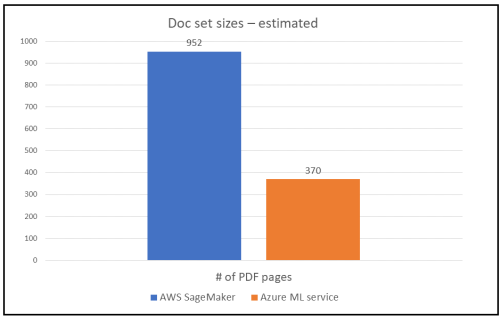
If you peruse the AWS Sagemaker documentation, you’ll see it’s exhaustive and well-organized. It covers machine learning features and concepts from top to bottom, including important topics, such as data security. It’s a big doc set that renders as a 952-page PDF.
There’s much to admire about it. But, some of it is phoned-in. For example, no one is surprised to learn that an image classification algorithm “takes an image as input and classifies it….”
There are a number of pages with thin, poorly conceived content — and that hurts search rank. There’s disagreement on the ideal per-page word count for ranking highly in search, but good web strategy and customer empathy tell you that each tech doc page should solve a problem and/or provide useful insight.
Azure Machine Learning service docs: Scenarios and fewer things
The Azure Machine Learning service documentation is a much smaller documentation set at about 52 articles, which renders as a 370-page PDF file. Using PDF pages isn’t an exact measure, but it’s a good-enough number for comparing the sizes of the doc sets.
It’s not exhaustive like the AWS documentation set, but it focuses on things customers want to do with the service, not concepts and features. Each page of the doc set is individually planned, and there aren’t any throw-away pages like the classification algorithm page in the AWS set.
Compare search rank
Here’s where I show you that more documentation doesn’t mean more page 1 rankings on Google. I don’t have access to traffic data — visits, unique visitors, and so on — for both the Azure and AWS doc sets and I can’t share Microsoft’s competitive data. But, anyone can easily get search rank and keyword data for each doc set with a BrightEdge subscription.
But first, a quick SEO joke for context:
- Q: What’s the best place to hide a dead body?
- A: Page 2 of Google.
Your goal is for your docs to rank as often as possible on page 1 of Google, and ideally in positions 1-5 where most of the clicks are.
How are they doing on page 1 of Google?
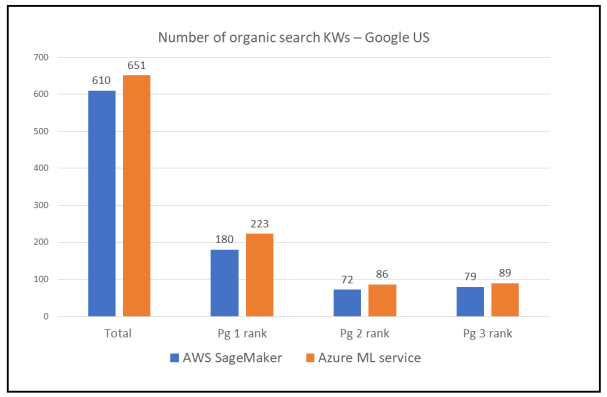
The AWS doc set has 180 keyword phrases ranking on page 1, with 103 keywords (KWs) ranking in positions 1-5 (Google US from BrightEdge Data Cube, February 2019).
The Azure Machine Learning service doc set has 223 keyword phrases ranking on page 1, with 104 KWs ranking in positions 1-5 (Google US data from BrightEdge Data Cube, February 2019). Azure ML service docs have more presence in on search page 1 and positions 1-5.
What about the high-ranking keywords?
Rank is just one lens to understand performance. Monthly KW keyword volume and whether the KWs are primarily branded or not are also important to consider.
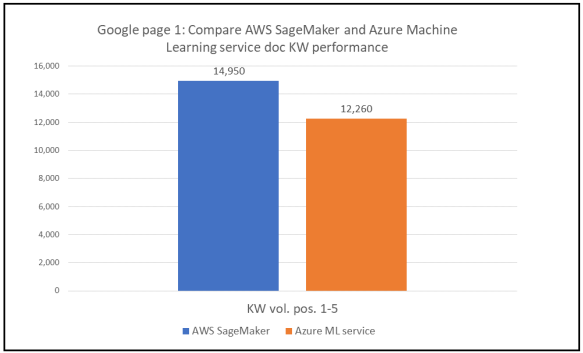
The high-ranking KWs for AWS SageMaker have more search volume overall at 14,950 monthly searches vs. 12,260 monthly searches for high-ranking Azure Machine Learning service KWs. SageMaker doc KWs are primarily branded KWs, meaning the keywords include SageMaker or related AWS proprietary terminology rather than common industry terms. Most of the high-ranking search volume comes from the 5,400 monthly searches on SageMaker and 3,600 monthly searches on AWS SageMaker (Google US, source BrightEdge Data Cube).
High-ranking KWs for Azure Machine Learning service are also primarily branded KWs, but the Azure brand has lower per-KW search volume.
Overall, the AWS SageMaker doc set doesn’t deliver the search performance you’d expect from a significant investment in a doc set about 3x larger than its competitor Azure Machine Learning service. For visibility on page 1 of Google US, SageMaker docs had fewer high-ranking KWs, although the popularity of the KWs (search volume) was greater.
Now, here are a few considerations for your leaner, meaner doc set.
Use customer intents that don’t rely solely on brand
If your tech docs rank only on your brands and feature names, you’re not reaching your audience.
To reach the most customers — both current and those you aspire to have — your docs need to address unbranded user intents. Not “How do I use Product X or Feature X?”, but “How do I do some task (with Product X or Feature X)?” Page titles, headings, and body text need to reflect an approach that uses common industry terminology to describe intents.
It’s not an either/or choice between branded and unbranded terms. Brands and feature names are important search KWs, but common industry terms tend to have higher search volume and are more familiar to your customers.
If the answer is easy to find, don’t document it
When you’re planning a doc set, cut concepts or instructions that are easily found elsewhere on the web. Why? There’s a popular research technique a brilliant colleague told me about: GTS.
Google That Shit.
That’s right: Most of your customers use Google to find answers.
Think about it. In an earlier blog post, I quoted the BrightEdge estimate that more than 50% of site traffic comes from search. Unless you are prepared to write the definitive answer using exceptionally high production values, let expert strangers on the internet answer common questions for your customers. They’ve already done it, and they did a better job than you probably have time or resources to.
If you’re not convinced by GTS, look for my upcoming post But what if I’m certain I can win Google page 1 with documentation on a technical subject already thoroughly covered on the web? I’m kidding, of course.
Bonus: Fewer docs keep the documentation lifecycle manageable
If you’re writing tech docs for an abacus, you’re looking at a projected content freshness half-life of centuries. Docs for the cloud technologies I work on, however, go stale in weeks or months. So, I’ve got to think about the documentation lifecycle: First versions, subsequent updates, and graceful deprecation.
Writing less documentation means you have less documentation to keep up to date. Updating documentation often takes longer than writing the first versions, as I’ve learned from my projects and those of my colleagues. I have years of anecdotal data here, and it’s worth paying attention to.
Publishing documentation is a commitment to your customers: They expect you to keep it up to date. Make sure you can meet that commitment.
Keeping your documentation set lean and focused on customer intents helps you win search, and it’s a first step to effectively managing the content lifecycle.
Categories: Content strategy
 Chasing the Long Tail
Leave a comment